

Home / Products / VeriLynx V60 Video Camera

VeriLynx V60 Video Camera

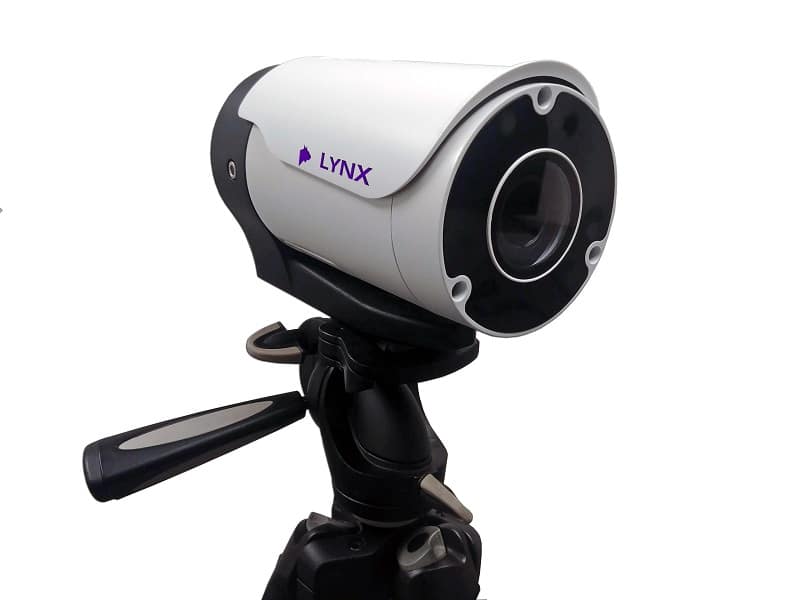
Under World Athletics Technical Rule 30.1.1, horizontal jump take-off failures are re-defined to include any breaking of the vertical plane of the take-off line. Rule 29.5 strongly encourages judges to use video or other technology to assist the decision process. VeriLynx cameras, along with special configuration of the FinishLynx software, can be used for this purpose. The VeriLynx V60 camera captures up to 1280 x 720 pixels at 60 fps. The camera includes an auto-iris motorized lens so the zoom and focus can be adjusted remotely within the FinishLynx software. It also has a sturdy housing that protects the lens and rear connections from moisture and damage. Set up the VeriLynx camera at your next field event and start capturing high-definition, time-stamped videos to verify each attempt.

FinishLynx software: version 12.00 and later includes the VeriLynx profile. This profile is customized to support the use of VeriLynx cameras for video review of field events, such as the verification of take-off fouls in the Long or Triple Jump events. Align the VeriLynx camera with the take-off board, load the field event start list, capture, verify, and timestamp every attempt. VeriLynx will save all images to disk in real-time (no image loss) and allow you to quickly review every attempt for every athlete, providing proof in case of a foul.

VeriLynx also has the option of exporting a JPEG of each attempt automatically when marking a frame, and keeping multiple VeriLynx image panes synchronized (time tracking) to view multiple angles.

  • Remotely adjust the camera’s Zoom and Focus within the FinishLynx software to optimize image quality
  • VeriLynx videos can be advanced and rewound frame-by-frame to ensure judges can find the frames showing the athletes’ attempts. Videos can also be reviewed in real time while the event: is still underway.
  • FinishLynx enables the standard EtherLynx camera features to be used with VeriLynx cameras, including zoom, automatic scrolling, gamma, brightness, and contrast adjustment.
  • VeriLynx video images are stored on the computer as individual images and can be printed directly from the FinishLynx software
  • VeriLynx videos can be manually cropped, viewed in forward or reverse, viewed at different speeds, exported to AVI format, and uploaded to the internet if desired.
  • VeriLynx video can be exported to .avi and: uploaded to YouTube, Facebook, or other popular services
  • Bei der Standardinstallation von FinishLynx steht ein vorkonfiguriertes Profil zur Verfügung, das eine angepasste Benutzeroberfläche für Feldwettbewerbe bietet
  • Möglichkeit, Feldwettkämpfe aus der Datei mit dem Feldwettkampfplan (fldlynx.sch) zu laden
  • Ability to view a vertical line in alignment mode for VeriLynx cameras to facilitate camera alignment with the take-off board
  • Ability to automatically capture based on detected motion and review all: attempts from a flight into the same FinishLynx image
  • Möglichkeit, den aktiven Bereich des ACM so einzustellen, dass er auf den vertikalen Bildbereich der Starttafel beschränkt ist
  • Möglichkeit, Versuche mit der Uhrzeit zu kennzeichnen/zu protokollieren, um während oder nach der Veranstaltung einen schnellen Überblick über alle Versuche jedes Athleten zu erhalten
  • Möglichkeit, die Versuchsnummer jedes Versuchs in der Ergebniszone und auf dem Bild mithilfe von Linienbeschriftungen anzuzeigen
  • Möglichkeit, ein Bild (JPG) automatisch zu exportieren, wenn ein Versuch markiert/protokolliert wird
  • Möglichkeit, die Zeitachse zu verfolgen (beim Scrollen durch das Bild einer Kamera werden die anderen Bildfenster mit dem entsprechenden Bild aktualisiert), um Bilder mehrerer Kameras zu vergleichen und so verschiedene Blickwinkel einfach zu überprüfen, einschließlich der Option, eine Frontkamera zur Identifizierung des Athleten zu nutzen

Sind Sie bereit, Ihre Ziellinie aufzuwerten?